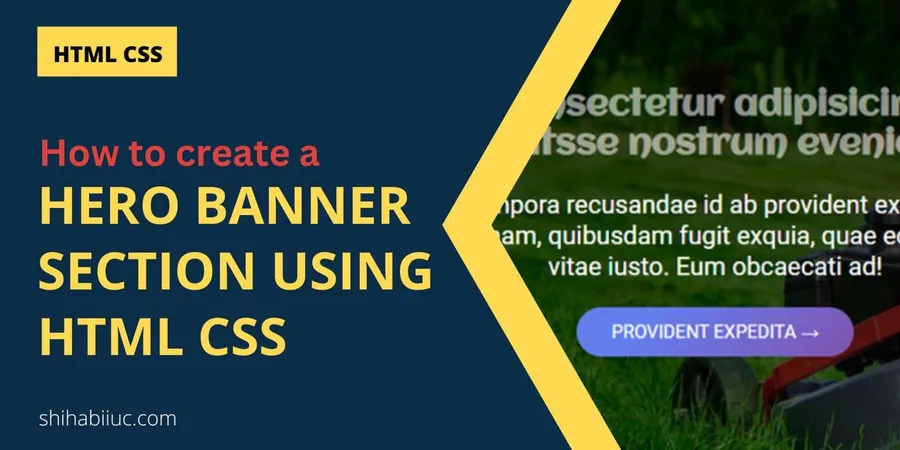
In this post, you will see how to create the hero banner image only using HTML & CSS. The hero banner image is generally known as the “Hero Section” on a web page.
It’s normally the first section of a web page. And this hero section generally consists of a background image and a background overlay color, and on top of that, it contains a heading, paragraph & CTA (call to action).
End of this post, I will give you the full source code & show you the live preview.
Let’s see how we can create a hero section as you see in the design below:

Hero banner section
I will give you a couple more designs in HTML & CSS. So you can practice more & choose a better banner based on your need.
Let’s move on.
How to create a hero banner using HTML CSS?
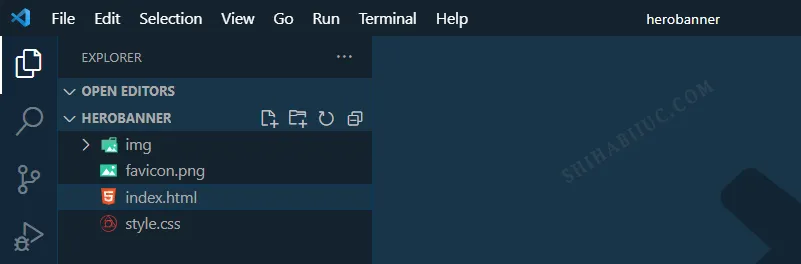
To show you the step-by-step process, I created a project folder on my desktop named “herobanner” and in your case, the name might be different. It really doesn’t matter.
See my project structure below.
Create an HTML & CSS file in your project folder
I created an HTML & CSS file named “index & style” accordingly. And I linked the stylesheet (style.css) to my index.html file.
Also, I created a folder inside the project folder named “img” to store all my images here (including the banner image or background image).
After that, I created an HTML markup for the hero section.
My HTML markup looks like this:
<!DOCTYPE html><html lang="en"><head> <meta charset="UTF-8"> <meta http-equiv="X-UA-Compatible" content="IE=edge"> <meta name="viewport" content="width=device-width, initial-scale=1.0"> <link rel="shortcut icon" href="favicon.png" type="image/x-icon"> <link href="https://fonts.googleapis.com/css2?family=Aclonica&display=swap" rel="stylesheet"> <link href="https://fonts.googleapis.com/css2?family=Roboto&display=swap" rel="stylesheet"> <link rel="stylesheet" href="style.css"> <title>Hero banner image using HTML & CSS</title></head><body> <section class="hero"> <div class="hero-container"> <h1>Consectetur adipisicing elitsse nostrum eveniet</h1> <p>Tempora recusandae id ab provident expedita magnam, quibusdam fugit exquia, quae eos nemo vitae iusto. Eum obcaecati ad!</p> <a href="index.html">Provident expedita →</a> </div> </section></body></html>I wrote the following CSS to make the banner/hero look nice and mobile responsive.
/*** Hero banner image template* Available for download on GitHub* Avaiable fonts:* font-family: 'Aclonica', sans-serif;* font-family: 'Roboto', sans-serif;* */
/* basic CSS reset */* { box-sizing: border-box;}body { padding: 0; margin: 0;}img { max-width: 100%;}/* Banner */body { font-family: 'Roboto', sans-serif;}.hero { background:linear-gradient(0deg, rgba(0, 0, 0, 0.6), rgba(0, 0, 0, 0.8)), url("./img/hero-banner-image-1.jpg"); background-size:cover; background-position: center; padding: 90px 15px;}.hero .hero-container { text-align: center; max-width: 1000px; margin: 0 auto;}.hero .hero-container h1{ color: rgba(255, 255, 255, 0.55); font-family: 'Aclonica', sans-serif; font-size: 30px; margin: 0;}.hero .hero-container p { color: #FFFFFF; font-size: 22px;}.hero .hero-container a { text-decoration: none; background-color: #7f53ac; background-image: linear-gradient(315deg, #7f53ac 0%, #647dee 74%); color: #FFFFFF; padding: 12px 30px; display: inline-block; text-transform: uppercase; border-radius: 25px; transition: all 0.9s ease;}.hero .hero-container a:hover { background-color: #42378f; background-image: linear-gradient(315deg, #42378f 0%, #f53844 74%); color: #000000; box-shadow: 0 4px 8px 0 rgba(0, 0, 0, 0.9), 0 6px 20px 0 rgba(0, 0, 0, 0.9);}@media (min-width: 768px) { .hero .hero-container h1{ font-size: 70px; }}After you have the above HTML & CSS in place, your hero banner image section will look like the design you have seen at the very top.
See the live preview & download the full template
I have created the live preview to better visualize the hero sections. You can also download the template & use it on your own projects.
Build HTML CSS projects
<table><tbody><tr><td><a href=“/about-page-template/”>About us template</a></td><td><a href=“https://shihabiiuc.github.io/aboutpage/” target=“_blank” rel=“noreferrer noopener”>Preview</a></td></tr><tr><td><a href=“/team-page/”>Team page</a></td><td><a href=“https://shihabiiuc.github.io/team-members-section/” target=“_blank” rel=“noreferrer noopener”>Preview</a></td></tr><tr><td><a href=“/testimonial-template/”>Testimonial page</a></td><td><a href=“https://shihabiiuc.github.io/testimonialpage/” target=“_blank” rel=“noreferrer noopener”>Preview</a></td></tr><tr><td><a href=“/testimonial-slider/”>Testimonial slider</a></td><td><a href=“https://shihabiiuc.github.io/testimonialslider/” target=“_blank” rel=“noreferrer noopener”>Preview</a></td></tr><tr><td><a href=“/contact-page-html-css/”>Contact page</a></td><td><a href=“https://shihabiiuc.github.io/contact-page/contact-us.html” target=“_blank” rel=“noreferrer noopener”>Preview</a></td></tr><tr><td><a href=“/create-multiple-page-website-html/”>Multipage website</a></td><td><a href=“https://shihabiiuc.github.io/multipagehtml/” target=“_blank” rel=“noreferrer noopener”>Preview</a></td></tr><tr><td><a href=“/portfolio-website-design-with-html-css/”>Portfolio website</a></td><td><a href=“https://shihabiiuc.github.io/portfolio/index.html” target=“_blank” rel=“noreferrer noopener”>Preview</a></td></tr><tr><td><a href=“/animated-portfolio-website/”>Animated portfolio</a></td><td><a href=“https://shihabiiuc.github.io/animated-portfolio/” target=“_blank” rel=“noreferrer noopener”>Preview</a></td></tr><tr><td><a href=“/computer-science-portfolio-website/”>Computer science portfolio</a></td><td><a href=“https://shihabiiuc.github.io/computerscienceportfolio/” target=“_blank” rel=“noreferrer noopener”>Preview</a></td></tr><tr><td><a href=“/html-navigation-bar/”>Navigation bar (without JS)</a></td><td>N/A</td></tr><tr><td><a href=“/hamburger-menu/”>Create a hamburger menu</a></td><td><a href=“https://shihabiiuc.github.io/hamburger-menu/” target=“_blank” rel=“noreferrer noopener”>Preview</a></td></tr><tr><td><a href=“/html-footer/”>Footer templates</a></td><td><a href=“https://shihabiiuc.github.io/footer-examples/” target=“_blank” rel=“noreferrer noopener”>Preview</a></td></tr><tr><td><a href=“/hero-banner-image-using-html-css/”>Hero banner</a></td><td><a href=“https://shihabiiuc.github.io/herobanner/” target=“_blank” rel=“noreferrer noopener”>Preview</a></td></tr><tr><td><a href=“/background-slider/”>Background slider</a></td><td><a href=“https://shihabiiuc.github.io/backgroundslider/” target=“_blank” rel=“noreferrer noopener”>Preview</a></td></tr><tr><td><a href=“/how-to-create-3-column-layout-in-html-css/”>Three-column layout template</a></td><td><a href=“https://shihabiiuc.github.io/column-layout/” target=“_blank” rel=“noreferrer noopener”>Preview</a></td></tr><tr><td><a href=“/two-column-layout-html-css/”>Two column layout</a></td><td><a href=“https://shihabiiuc.github.io/two-column-layout/” target=“_blank” rel=“noreferrer noopener”>Preview</a></td></tr><tr><td><a href=“/thank-you-page-html-css/”>Thank you page</a></td><td><a href=“https://shihabiiuc.github.io/thank-you/” target=“_blank” rel=“noreferrer noopener”>Preview</a></td></tr><tr><td><a href=“/resume-html-css/” data-type=“link” data-id=“http://localhost/shihabiiuc/resume-html-css/">Resume template</a></td><td><a href=“https://shihabiiuc.github.io/resume/” data-type=“link” data-id=“https://shihabiiuc.github.io/resume/” target=“_blank” rel=“noreferrer noopener”>Preview</a></td></tr><tr><td><a href=“/coming-soon-template/” data-type=“link” data-id=“http://localhost/shihabiiuc/coming-soon-template/">Coming soon template</a></td><td><a href=“https://shihabiiuc.github.io/coming-soon/” data-type=“link” data-id=“https://shihabiiuc.github.io/coming-soon/” target=“_blank” rel=“noreferrer noopener”>Preview</a></td></tr><tr><td><a href=“/create-landing-page-using-html-css-js/” data-type=“link” data-id=“http://localhost/shihabiiuc/create-landing-page-using-html-css-js/">Landing page template</a></td><td><a href=“https://shihabiiuc.github.io/landing-page/” data-type=“link” data-id=“https://shihabiiuc.github.io/landing-page/” target=“_blank” rel=“noreferrer noopener”>Preview</a></td></tr><tr><td><a href=“/roofing-website-template-for-download-responsive/” data-type=“link” data-id=“http://localhost/shihabiiuc/roofing-website-template-for-download-responsive/">Roofing website template</a></td><td><a href=“https://shihabiiuc.github.io/roofing-website/” data-type=“link” data-id=“https://shihabiiuc.github.io/roofing-website/” target=“_blank” rel=“noreferrer noopener”>Preview</a></td></tr></tbody></table>
Conclusion
If you have any questions about the hero section that I built or if you don’t understand anything, or if you want to see/download more hero sections like this, please let me know.