
There is no href attribute for the div. So to make an entire div a link, you have to wrap it inside an anchor tag.
See the example HTML below.
<a href="link-to-another-page"> <div> <h2>This is a heading</h2> <img src="./img/car-wash.jpg" alt="car wash"> <p>Lorem ipsum dolor sit amet consectetur adipisicing elit.</p> </div></a>In the above code, you see that I have a couple of HTML elements such as a heading, image & paragraph. All these elements live inside a <div>. And this whole div is wrapped by an anchor tag (<a>).
This is how you can make a whole div a link. If you click anywhere in the div no matter if it’s a heading, image, paragraph, button, or something else, it will redirect you to another page (that you linked to).
With the above HTML, the output looks like the screenshot below.
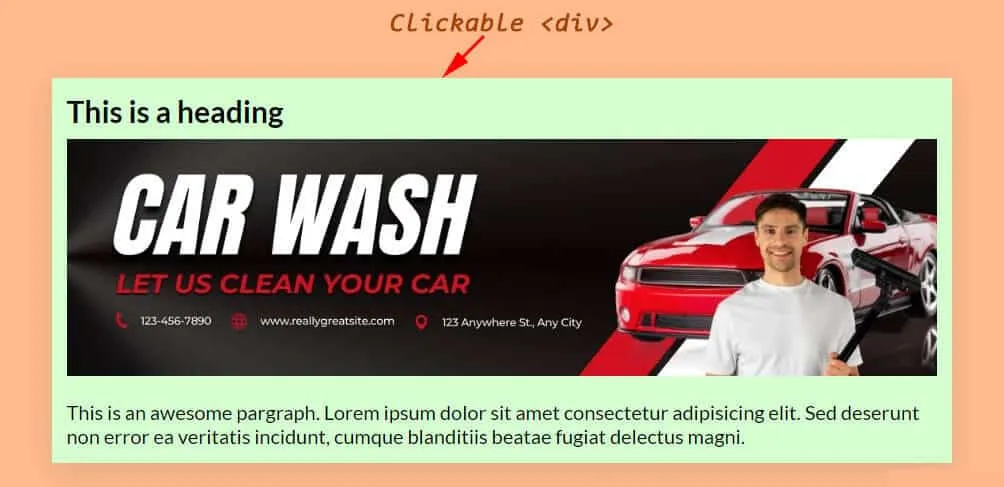
You really don’t need CSS to make the clickable div work. However, you may need some basic styling for it.
For the above screenshot & the HTML, I have the following CSS.
div { background-color: #D4FFD1; max-width: 900px; margin: 0 auto; padding: 15px;}div a { text-decoration: none; color: initial;}And it brings me to the end of this post.
Learn more about HTML links
- How do you make a div clickable link?
- How do you create an HTML mailto link (including email subject)?
Build HTML CSS projects
<table><tbody><tr><td><a href=“/about-page-template/”>About us template</a></td><td><a href=“https://shihabiiuc.github.io/aboutpage/” target=“_blank” rel=“noreferrer noopener”>Preview</a></td></tr><tr><td><a href=“/team-page/”>Team page</a></td><td><a href=“https://shihabiiuc.github.io/team-members-section/” target=“_blank” rel=“noreferrer noopener”>Preview</a></td></tr><tr><td><a href=“/testimonial-template/”>Testimonial page</a></td><td><a href=“https://shihabiiuc.github.io/testimonialpage/” target=“_blank” rel=“noreferrer noopener”>Preview</a></td></tr><tr><td><a href=“/testimonial-slider/”>Testimonial slider</a></td><td><a href=“https://shihabiiuc.github.io/testimonialslider/” target=“_blank” rel=“noreferrer noopener”>Preview</a></td></tr><tr><td><a href=“/contact-page-html-css/”>Contact page</a></td><td><a href=“https://shihabiiuc.github.io/contact-page/contact-us.html” target=“_blank” rel=“noreferrer noopener”>Preview</a></td></tr><tr><td><a href=“/create-multiple-page-website-html/”>Multipage website</a></td><td><a href=“https://shihabiiuc.github.io/multipagehtml/” target=“_blank” rel=“noreferrer noopener”>Preview</a></td></tr><tr><td><a href=“/portfolio-website-design-with-html-css/”>Portfolio website</a></td><td><a href=“https://shihabiiuc.github.io/portfolio/index.html” target=“_blank” rel=“noreferrer noopener”>Preview</a></td></tr><tr><td><a href=“/animated-portfolio-website/”>Animated portfolio</a></td><td><a href=“https://shihabiiuc.github.io/animated-portfolio/” target=“_blank” rel=“noreferrer noopener”>Preview</a></td></tr><tr><td><a href=“/computer-science-portfolio-website/”>Computer science portfolio</a></td><td><a href=“https://shihabiiuc.github.io/computerscienceportfolio/” target=“_blank” rel=“noreferrer noopener”>Preview</a></td></tr><tr><td><a href=“/html-navigation-bar/”>Navigation bar (without JS)</a></td><td>N/A</td></tr><tr><td><a href=“/hamburger-menu/”>Create a hamburger menu</a></td><td><a href=“https://shihabiiuc.github.io/hamburger-menu/” target=“_blank” rel=“noreferrer noopener”>Preview</a></td></tr><tr><td><a href=“/html-footer/”>Footer templates</a></td><td><a href=“https://shihabiiuc.github.io/footer-examples/” target=“_blank” rel=“noreferrer noopener”>Preview</a></td></tr><tr><td><a href=“/hero-banner-image-using-html-css/”>Hero banner</a></td><td><a href=“https://shihabiiuc.github.io/herobanner/” target=“_blank” rel=“noreferrer noopener”>Preview</a></td></tr><tr><td><a href=“/background-slider/”>Background slider</a></td><td><a href=“https://shihabiiuc.github.io/backgroundslider/” target=“_blank” rel=“noreferrer noopener”>Preview</a></td></tr><tr><td><a href=“/how-to-create-3-column-layout-in-html-css/”>Three-column layout template</a></td><td><a href=“https://shihabiiuc.github.io/column-layout/” target=“_blank” rel=“noreferrer noopener”>Preview</a></td></tr><tr><td><a href=“/two-column-layout-html-css/”>Two column layout</a></td><td><a href=“https://shihabiiuc.github.io/two-column-layout/” target=“_blank” rel=“noreferrer noopener”>Preview</a></td></tr><tr><td><a href=“/thank-you-page-html-css/”>Thank you page</a></td><td><a href=“https://shihabiiuc.github.io/thank-you/” target=“_blank” rel=“noreferrer noopener”>Preview</a></td></tr><tr><td><a href=“/resume-html-css/” data-type=“link” data-id=“http://localhost/shihabiiuc/resume-html-css/">Resume template</a></td><td><a href=“https://shihabiiuc.github.io/resume/” data-type=“link” data-id=“https://shihabiiuc.github.io/resume/” target=“_blank” rel=“noreferrer noopener”>Preview</a></td></tr><tr><td><a href=“/coming-soon-template/” data-type=“link” data-id=“http://localhost/shihabiiuc/coming-soon-template/">Coming soon template</a></td><td><a href=“https://shihabiiuc.github.io/coming-soon/” data-type=“link” data-id=“https://shihabiiuc.github.io/coming-soon/” target=“_blank” rel=“noreferrer noopener”>Preview</a></td></tr><tr><td><a href=“/create-landing-page-using-html-css-js/” data-type=“link” data-id=“http://localhost/shihabiiuc/create-landing-page-using-html-css-js/">Landing page template</a></td><td><a href=“https://shihabiiuc.github.io/landing-page/” data-type=“link” data-id=“https://shihabiiuc.github.io/landing-page/” target=“_blank” rel=“noreferrer noopener”>Preview</a></td></tr><tr><td><a href=“/roofing-website-template-for-download-responsive/” data-type=“link” data-id=“http://localhost/shihabiiuc/roofing-website-template-for-download-responsive/">Roofing website template</a></td><td><a href=“https://shihabiiuc.github.io/roofing-website/” data-type=“link” data-id=“https://shihabiiuc.github.io/roofing-website/” target=“_blank” rel=“noreferrer noopener”>Preview</a></td></tr></tbody></table>
Conclusion
Now you know how to make a div that acts like a link. And this clickable div can contain any HTML element.
After you wrap the <div> inside the <a> tag, all the heading, text, etc may have an underline & the color may turn blue. But this you can fix/override by CSS (that I showed you above).